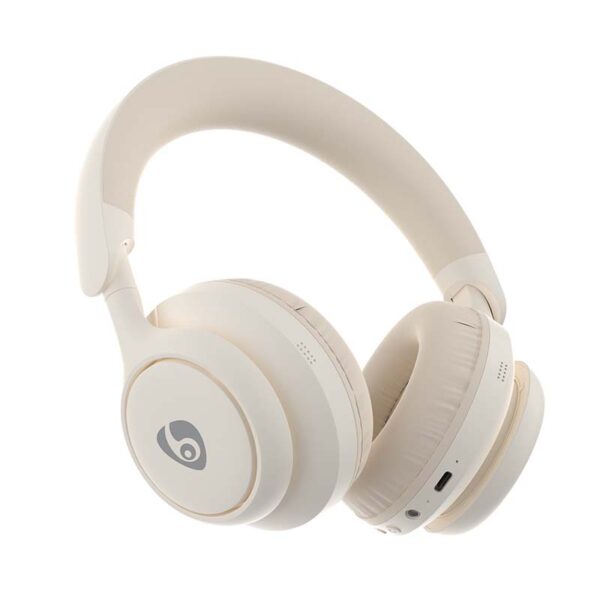
Android Bluetooth용 헤드폰에서 낮은 대기 시간 오디오 지원?
모바일 게임 및 비디오 스트리밍에는 시각과 청각의 완벽한 동기화가 필요합니다.. 하지만, 많은 사용자가 무선 장비를 사용하는 동안 답답한 지연을 경험합니다.. Android Bluetooth용 헤드폰이 실제로 실시간 오디오를 전달할 수 있는지 궁금할 것입니다.. 이러한 지연으로 인해 치열한 경쟁 경기나 영화 영화의 경험이 망가지는 경우가 많습니다.. 다행스럽게도, 현대 기술은 이러한 디지털 격차를 해소할 수 있는 여러 가지 솔루션을 제공합니다.. This guide explores the technical reality of wireless latency on the Android platform. We will help you find the best hardware for a lag-free lifestyle.
The Hidden Truth About Wireless Audio Lag
Every wireless connection introduces some level of delay during data transmission. Engineers refer to this specific delay as “latency.”
Why Does Latency Happen?
Your phone must first compress the digital audio data. 다음, it sends this data over radio waves to your ears. 마지막으로, your headphones must decompress the signal before you hear it. 따라서, these steps consume valuable milliseconds. Standard connections often reach 200ms of delay. This is very noticeable to the human ear.
The Android Advantage
Android remains a highly flexible operating system for audio enthusiasts. Unlike restricted ecosystems, Android supports a wide variety of advanced Bluetooth codecs. 그러므로, your choice of headphones for Android Bluetooth directly impacts your final speed.
Core Technologies: Codecs That Change the Game
To achieve low latency, both your phone and headset must speak the same language. These “languages” are known as Bluetooth codecs.
-
aptX Adaptive: This smart codec adjusts its bitrate in real-time. It prioritizes low latency when you start a mobile game.
-
LDAC: While famous for high-resolution music, it offers stable performance. 하지만, it often focuses more on quality than raw speed.
-
AAC: Many Android devices support this, but performance varies by manufacturer. It often lags more than specialized gaming codecs.
-
SBC: This is the universal standard for all devices. Unfortunately, it usually provides the highest latency and lowest quality.
If you want the fastest response, look for the “aptX LL” or “Adaptive” badge. These technologies reduce delay to under 40ms. This speed feels virtually instantaneous to most users.
Use Developer Options
Android allows you to access hidden settings for deeper control. 첫 번째, enable “Developer Options” in your phone settings menu. Then, look for the Bluetooth Audio Codec selection. You can manually force your phone to use the fastest available codec.
Enable Gaming Mode
Many modern smartphones feature a dedicated “Game Space” or “Gaming Mode.” These tools prioritize CPU power and wireless bandwidth for your active application. 따라서, they often lower the latency for any connected headphones for Android Bluetooth.

The Role of Bluetooth 5.3 and LE Audio
The latest iterations of Bluetooth technology bring massive improvements to the table. We are currently seeing a shift toward a new standard called “LE Audio.”
What is LE Audio?
LE Audio uses a new codec called LC3. This codec is highly efficient and designed for low power consumption. More importantly, it handles data transmission much faster than older versions. 그러므로, future headphones for Android Bluetooth will offer much better sync out of the box.
Stability and Range
블루투스 5.3 also improves signal stability in crowded areas. A stronger connection means fewer dropped packets. Fewer dropped packets mean your audio stays perfectly in sync with your screen.
Why Your Choice of Manufacturer Matters
Expertise in Engineering Top-tier brands invest millions in custom antenna designs. They do not just use off-the-shelf components. Expert engineering ensures that the wireless signal remains fast and clear.
Trustworthiness and Certification Always check for official Bluetooth SIG certifications. Trustworthy manufacturers list their supported codecs clearly on the packaging. Avoid “no-name” brands that make vague promises about “zero lag” without technical proof.
Practical Buying Tips for Low Latency
Are you ready to purchase new headphones for Android Bluetooth? Keep these essential tips in mind to ensure total satisfaction.
-
Check Chipset Compatibility: Ensure your phone uses a Qualcomm processor for the best aptX support.
-
Verify App Support: Some brands offer companion apps. These apps often include a “Low Latency” toggle switch.
-
Read Latency Benchmarks: Do not rely on marketing fluff. Look for independent tests that measure actual millisecond delays.
-
Consider Wired Backup: If you are a professional gamer, ensure your headset has a 3.5mm jack. Cables always provide the lowest possible latency.

The Impact of Environment on Audio Speed
Your physical surroundings can actually affect your wireless performance. Radio interference from Wi-Fi routers or microwaves creates digital “noise.” This noise forces your headphones for Android Bluetooth to re-send data packets.
Naturally, this re-sending process increases the total delay you experience. To maintain the lowest latency, stay close to your device. 뿐만 아니라, try to avoid areas with dozens of active wireless signals. A clear path between your phone and your head always helps.
Can You Achieve Perfect Sync?
The short answer is yes. Headphones for Android can definitely support low latency audio today. 하지만, you must choose the right combination of hardware and software settings. By prioritizing codecs like aptX Adaptive, you can enjoy a seamless experience. The gap between wired and wireless performance is closing fast. Soon, latency issues will become a thing of the past for all Android users.
Upgrade your audio setup today and feel the difference in your favorite games. Your ears deserve the fastest connection possible!

저자 소개